What does Agile actually do?

For the forgetful and/or the nostalgic, here's a reminder of what the old site looked like. If there's a particular feature you miss, please let us know!

For the forgetful and/or the nostalgic, here's a reminder of what the old site looked like. If there's a particular feature you miss, please let us know!

There's one question almost everybody asks us: "What do you guys actually do?". The more brazen get straight to the point: "How do you guys make money?". One way to answer this question, without making people wait till they meet us, is with the website. And our website has always been quite... bloggy. It's easy to see how we don't make money, less obvious how we do.

New website

After 4 years with the same design, we've given the site a new look. Four years is half a lifetime in web years, so we now have lots of upgraded features, like mobile responsiveness, integrated commerce, and lots of dynamic content. We can also make it a bit easier to see what people hire us for, and to hire us yourself. 

Here's a quick overview of some of the new content:

  • Services — things we do for money.
  • Courses — boost your skills as a scientist and communicator.
  • Products — things we make... for money, or for fun, or because they have to be done.
  • Shop — where you can buy boxes of books, and maybe more one day. 
  • Projects — some of the bigger things we're into right now, like Modelr and SubSurfWiki.

I still find it hard to describe what we do, and I kind of like it that way. We're not easy to pigeonhole. We're fortunate not only to have always had enough work, but also to work with some of the smartest and most energetic people in our industry. But I hope our new site goes some way to making it easier to find out how we might be able to help you and your organization be a bit more awesome. That's what we're here for. 


Some geeky footnotes

For anyone who's interested, the site is powered by Squarespace 7. We were previously on Squarespace 5. There's a lot of upside to a package deal like Squarespace, but of course you lose some flexibility. I might have thought about moving to another platform, perhaps WordPress and its open source goodness, but in the end the ease of transferring our 400+ blog posts was the deciding factor. 

For those of you using a news reader like The Old Reader to read our blog, please note that the old 'journal' feed URL no longer works — please update it to http://www.agilegeoscience.com/blog?format=RSS. The Feedburner feed is still active, at least for now.

Geocomputing: Call for papers

52 Things .+? Geocomputing is in the works.

For previous books, we've reached out to people we know and trust. This felt like the right way to start our micropublishing project, because we had zero credibility as publishers, and were asking a lot from people to believe anything would come of it.

Now we know we can do it, but personal invitation means writing to a lot of people. We only hear back from about 50% of everyone we write to, and only about 50% of those ever submit anything. So each book takes about 160 invitations.

This time, I'd like to try something different, and see if we can truly crowdsource these books. If you would like to write a short contribution for this book on geoscience and computing, please have a look at the author guidelines. In a nutshell, we need about 600 words before the end of March. A figure or two is OK, and code is very much encouraged. Publication date: fall 2015.

We would also like to find some reviewers. If you would be available to read at least 5 essays, and provide feedback to us and the authors, please let me know

In keeping with past practice, we will be donating money from sales of the book to scientific Python community projects via the non-profit NumFOCUS Foundation.

What the cover might look like. If you'd like to write for us, please read the author guidelines.

What the cover might look like. If you'd like to write for us, please read the author guidelines.

2014 retrospective

At this time of year, we look back at the best of the blog — what were the most read, the most contentious, the most informative posts of the year? If you only stop by once every 12 months, this is the post for you!

Your favourites

Let's turn to the data first. Which posts got the most hits this year? Older posts have a time advantage of course, but here are the most popular new posts, starting with the SEG-Y double-bill:

It's hard to say exactly how much attention a given post gets, because they sit on the front page of the site for a couple of weeks. Overall we got about 150 000 pageviews this year, and I think Well tie workflow — the most-read old post on the site this year — might have been read (okay, looked at) 5000 or so times.

I do love how some of our posts keep on giving: none of the top posts this year topped this year's readership of some golden oldies: Well tie workflow (written in April 2013), Six books about seismic interpretation (March 2013), k is for wavenumber (May 2012), Interpreting spectral gamma-ray logs (February 2013), or Polarity cartoons (April 2012).

What got people talking

When it all goes quiet on the comments, I worry that we're not provocative enough. But some posts provoke a good deal of chat, and always bring more clarity and depth to the issue. Don't miss the comments in Lusi's 8th birthday...

Our favourites

We have our favourites too. Perhaps because a lot of work went into them (like Evan's posts about programming), or because they felt like important things to say (as in the 'two sides' post), or because they feel like part of a bigger idea.

Where is everybody?

We don't collect detailed demographic data, but it's fun to see how people are reading, and roughly where they are. One surprise: the number of mobile readers did not rise this year — it's still about 15%. The top 10 cities were

Agile_top_60plus_cities_2014.png
  1. Houston, USA
  2. Calgary, Canada
  3. London, UK
  4. Perth, Australia
  5. Ludwigshafen, Germany
  6. Denver, USA
  7. Aberdeen, UK
  8. Moscow, Russia
  9. Stavanger, Norway
  10. Kuala Lumpur, Malaysia

Last thing

Thank You for reading! Seriously: we want to be a useful and interesting part of our community, so every glance at our posts, every comment, and every share, help us figure out how to be more useful and more interesting. We aim to get better still next year, with more tips and tricks, more code, more rants, and more conference reports — we look forward to sharing everything Agile with you in 2015.

If this week is Christmas for you, then enjoy the season. All the best for the new year!

Previous Retrospective posts... 2011 retrospective •  2012 retrospective2013 retrospective

Laying out a seismic survey

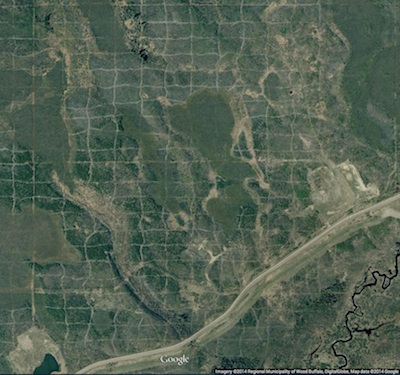
Cutlines for a dense 3D survey at Surmont field, Alberta, Canada. Image: Google Maps.

Cutlines for a dense 3D survey at Surmont field, Alberta, Canada. Image: Google Maps.

Cutlines for a dense 3D survey at Surmont field, Alberta, Canada. Image: Google Maps.There are a number of ways to lay out sources and receivers for a 3D seismic survey. In forested areas, a designer may choose a pattern that minimizes the number of trees that need to be felled. Where land access is easier, designers may opt for a pattern that is efficient for the recording crew to deploy and pick up receivers. However, no matter what survey pattern used, most geometries consist of receivers strung together along receiver lines and source points placed along source lines. The pairing of source points with live receiver stations comprises the collection of traces that go into making a seismic volume.

An orthogonal surface pattern, with receiver lines laid out perpendicular to the source lines, is the simplest surface geometry to think about. This pattern can be specified over an area of interest by merely choosing the spacing interval between lines well as the station intervals along the lines. For instance:

xmi = 575000        # Easting of bottom-left corner of grid (m)
ymi = 4710000       # Northing of bottom-left corner (m)
SL = 600            # Source line interval (m)
RL = 600            # Receiver line interval (m)
si = 100            # Source point interval (m)
ri = 100            # Receiver point interval (m)
x = 3000            # x extent of survey (m)
y = 1800            # y extent of survey (m)

We can calculate the number of receiver lines and source lines, as well as the number of receivers and sources for each.

# Calculate the number of receiver and source lines.
rlines = int(y/RL) + 1
slines = int(x/SL) + 1

# Calculate the number of points per line (add 2 to straddle the edges). 
rperline = int(x/ri) + 2 
sperline = int(y/si) + 2

# Offset the receiver points.
shiftx = -si/2.
shifty = -ri/2.

Computing coordinates

We create a list of x and y coordinates with a nested list comprehension — essentially a compact way to write 'for' loops in Python — that iterates over all the stations along the line, and all the lines in the survey.

# Find x and y coordinates of receivers and sources.
rcvrx = [xmi+rcvr*ri+shifty for line in range(rlines) for rcvr in range(rperline)]
rcvry = [ymi+line*RL+shiftx for line in range(rlines) for rcvr in range(rperline)]

srcx = [xmi+line*SL for line in range(slines) for src in range(sperline)]
srcy = [ymi+src*si for line in range(slines) for src in range(sperline)]

To make a map of the ideal surface locations, we simply pass this list of x and y coordinates to a scatter plot:

srcs_recs_pattern.png

Plotting these lists is useful, but it is rather limited by itself. We're probably going to want to do more calculations with these points — midpoints, azimuth distributions, and so on — and put these data on a real map. What we need is to insert these coordinates into a more flexible data structure that can hold additional information.

Shapely, Pandas, and GeoPandas

Shapely is a library for creating and manipulating geometric objects like points, lines, and polygons. For example, Shapely can easily calculate the (x, y) coordinates halfway along a straight line between two points.

Pandas provides high-performance, easy-to-use data structures and data analysis tools, designed to make working with tabular data easy. The two primary data structures of Pandas are:

  • Series — a one-dimensional labelled array capable of holding any data type (strings, integers, floating point numbers, lists, objects, etc.)
  • DataFrame — a 2-dimensional labelled data structure where the columns can contain many different types of data. This is similar to the NumPy structured array but much easier to use.

GeoPandas combines the capabilities of Shapely and Pandas and greatly simplifies geospatial operations in Python, without the need for a spatial database. GeoDataFrames are a special case of DataFrames that are specifically for representing geospatial data via a geometry column. One awesome thing about GeoDataFrame objects is they have methods for saving data to shapefiles.

So let's make a set of (x,y) pairs for receivers and sources, then make Point objects using Shapely, and in turn add those to GeoDataFrame objects, which we can write out as shapefiles:

# Zip into x,y pairs.
rcvrxy = zip(rcvrx, rcvry)
srcxy = zip(srcx, srcy)

# Create lists of shapely Point objects.
rcvrs = [Point(x,y) for x,y in rcvrxy]
srcs = [Point(x,y) for x,y in srcxy]

# Add lists to GeoPandas GeoDataFrame objects.
receivers = GeoDataFrame({'geometry': rcvrs})
sources = GeoDataFrame({'geometry': srcs})

# Save the GeoDataFrames as shapefiles.
receivers.to_file('receivers.shp')
sources.to_file('sources.shp')

It's a cinch to fire up QGIS and load these files as layers on top of a satellite image or physical topography map. As a survey designer, we can now add, delete, and move source and receiver points based on topography and land issues, sending the data back to Python for further analysis.

seismic_GIS_physical.png

All the code used in this post is in an IPython notebook. You can read it, and even execute it yourself. Put your own data in there and see how it comes out!

NEWSFLASH — If you think the geoscientists in your company would like to learn how to play with geological and geophysical models and data — exploring seismic acquisition, or novel well log displays — we can come and get you started! Best of all, we'll help you get up and running on your own data and your own ideas.

If you or your company needs a dose of creative geocomputing, check out our new geocomputing course brochure, and give us a shout if you have any questions. We're now booking for 2015.

The race for useful offsets

We've been working on a 3D acquisition lately. One of the factors influencing the layout pattern of sources and receivers in a seismic survey is the range of useful offsets over the depth interval of interest. If you've got more than target depth, you'll have more than one range of useful offsets. For shallow targets this range is limited to small offsets, due to direct waves and first breaks. For deeper targets, the range is limited at far offsets by energy losses due to geometric spreading, moveout stretch, and system noise.

In seismic surveying, one must choose a spacing interval between geophones along a receiver line. If phones are spaced close together, we can collect plenty of samples in a small area. If the spacing is far apart, the sample density goes down, but we can collect data over a bigger area. So there is a trade-off and we want to maximize both; high sample density covering the largest possible area.

What are useful offsets?

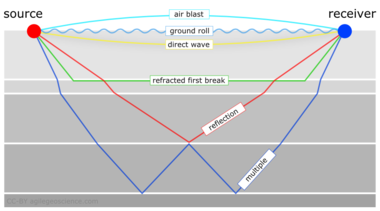
It isn't immediately intuitive why illuminating shallow targets can be troublesome, but with land seismic surveying in particular, first breaks and near surface refractions clobber shallow reflecting events. In the CMP domain, these are linear signals, used for determining statics, and are discarded by muting them out before migration. Reflections that arrive later than the direct wave and first refractions don't get muted out. But if these reflections arrive later than the air blast noise or ground roll noise — pervasive at near offsets — they get caught up in noise too. This region of the gather isn't muted like the top mute, otherwise you'd remove the data at near offsets. Instead, the gathers are attacked with algorithms to eliminate the noise. The extent of each hyperbola that passes through to migration is what we call the range of useful offsets.

muted_moveout2.png

The deepest reflections have plenty of useful offsets. However if we wanted to do adequate imaging somewhere between the first two reflections, for instance, then we need to make sure that we record redundant ray paths over this smaller range as well. We sometimes call this aperture; the shallow reflection is restricted in the number of offsets that it can be illuminated with, the deeper reflections can tolerate an aperture that is more open. In this image, I'm modelling the case of 60 geophones spanning 3000 metres, spaced evenly at 100 metres apart. This layout suggests merely 4 or 5 ray paths will hit the uppermost reflection, the shortest ray paths at small offsets. Also, there is usually no geophone directly on top of the source location to record a vertical ray path at zero offset. The deepest reflections however, should have plenty of fold, as long as NMO stretch, geometric spreading, and noise levels were good.

The problem with determining the range of useful offsets by way of a model is, not only does it require a velocity profile, which is easily attained from a sonic log, VSP, or velocity analysis, but it also requires an estimation of the the speed, intensity, and duration of the near surface events to be muted. Parameters that depend largely on the nature of the source and the local ground conditions, which vary from place to place, and from one season to the next.

In a future post, we'll apply this notion of useful offsets to build a pattern for shooting a 3D.


Click here for details on how I created this figure using the IPython Notebook. If you don't have it, IPython is easy to install. The easiest way is to install all of scientific Python, or use Canopy or Anaconda.

This post was inspired in part by Norm Cooper's 2004 article, A world of reality: Designing 3D seismic programs for signal, noise, and prestack time-migration. The Leading Edge23 (10), 1007-1014.DOI: 10.1190/1.1813357

Update on 2014-12-17 13:04 by Matt Hall
Don't miss the next installment — Laying out a seismic survey — with more IPython goodness!

The new open geophysics tools

The hackathon in Denver was more than 6 weeks ago. I kept thinking, "Oh, I must post a review of what went down" (beyond the quick wrap-up I did at the time), but while I'm a firm believer in procrastination six weeks seems unreasonable... Maybe it's taken this long to scrub down to the lasting lessons. Before those, I want to tell you who the teams were, what they did, and where you can find their (100% open source!) stuff. Enjoy!

Geophys Wiz

Andrew Pethick, Josh Poirier, Colton Kohnke, Katerina Gonzales, and Elijah Thomas — GitHub repo

This team had no trouble coming up with ideas — perhaps a reflection of their composition, which was more heterogeneous than the other teams. Josh is at NEOS, the consulting and software firm, and Andrew is a postdoc at Curtin in Perth, Australia, while the other 3 are students at Mines. The team eventually settled on building MT Black Box, a magnetotellurics modeling web application. 

Last thing: Don't miss Andrew Pethick's write-up of the event. 

Seemingly Concerned Neighbours

Elias Arias, Brent Putman, Thomas Rapstine, and Gabriel Martinez — Github repo

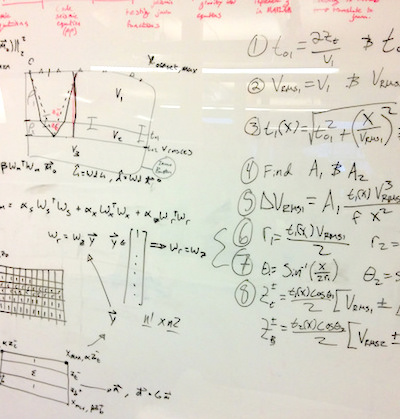
These four young geophysicists from the Colorado School of Mines impressed everyone with their work ethic. Their tight-knit team came in with a plan, and proceeded to scribble up the coolest-looking whiteboard of the weekend. After learning some Android development skills 'earlier this week', they pulled together a great little app for forward modeling magnetotelluric responses. 

Hackathon_well_tie_guys.jpg

Well tie guys

Michaël Montouchet, Graham Dawes, Mark Roberts

It was terrific to have pro coders Graham and Michaël with us — they flew from the UK to be with us, thanks to their employer and generous sponsor ffA GeoTeric. They hooked up with Mark, a Denver geophysicist and developer, and hacked on a well-tie web application, rightly identifying a gap in the open source market, so to speak (there is precious little out there for well-based workflows). They may have bitten off more than they could chew in just 2 days, so I hope we can get together with them again to finish it off. Who's up for a European hackathon? 

These two characters from UBC didn't get going till Sunday morning, but in just five hours they built a sweet web app for forward modeling the DC resistivity response of a buried disk. They weren't starting from scratch, because Rowan and others have spent months honing SimPEG, a rich open-source geophysical library, but minds were nonetheless blown.

Key takeaway: interactivity beyond sliders for the win.

Pick This!

Ben Bougher, Jacob Foshee, Evan Bianco, and an immiscible mixture of Chris Chalcraft and me — GitHub repo

Wouldn't you sometimes like to know how other people would interpret the section you're working on? This team, a reprise of the dream team from Houston in 2013, built a simple way to share images and invite others to interpret them. When someone has completed their interpretation, only then do they get to see the ensemble — everyone else's interpretations — in a heatmap. Not only did this team demo live software at pickthis.io, but the audience provided the first crowdsourced picks in real time. 

We'll be blogging more about Pick This soon. We're actively seeking ideas, images, interpreters, and financial support. Keep an eye out.

What I learned at this hackathon

  • Potential fields are an actual thing! OK, kidding, but three out of five teams built potential field modeling tools. I wasn't expecting that, and I think the judges were impressed at the breadth. 
  • 30 hours is easily enough time to build something pretty cool. Heck, 5 hours is enough if you're made of the right stuff. 
  • Students can happily build prototypes alongside professional developers, and even teach them a thing or two. And vice versa. Are hackathons a leveller of playing fields?
  • We need to remove the road blocks to more people enjoying this event. To help with this, next time there will be a 1-day bootcamp before the hackathon.
  • After virtually doubling in size from 2013 to 2014, it's clear that the 2015 Hackathon in New Orleans is going to be awesome! Mark your calendar: 17 and 18 October 2015.

Thank you!

Thank you to the creative, energetic geophysicists that came. It was a privilege to meet and hack with you!

Thank you to the judges who gave up their Sunday teatime to watch the demos and give precious feedback to the teams: Steve Adcock, Jamie Allison, Maitri Erwin, Dennis Cooke, Chris Krohn, Shannon Bjarnason, David Holmes, and Tracy Stark. Amazing people, one and all.

A final Thank You to our sponsors — dGB Earth Sciences, ffA GeoTeric, and OpenGeoSolutions. You guys are totally awesome! Seriously.

sponsors_white_noagile.png

It's the GGGG (giant geoscience gift guide)

I expect you've been wondering what to get me and Evan for Christmas. Wonder no more! Or, if you aren't that into Agile, I suppose other geoscientists might even like some of this stuff. If you're feeling more needy than generous, just leave this post up on a computer where people who love you will definitely see it, or print it out and mail it to everyone you know with prominent red arrows pointing to the things you like best. That's what I do.

Geology in the home

Paul_Smith_rug.jpg

Art!

Museums and trips and stuff

Image is CC-BY by Greg Westfall on Flickr

Image is CC-BY by Greg Westfall on Flickr

Geo-apparel

Blimey... books!

Who over the age of 21 or maybe 30 doesn't love getting books for Christmas? I don't!... not love it. Er, anyway, here are some great reads!

  • How about 156 things for the price of three? Yeah, that is a deal.
  • They're not geological but my two favourite books of the year were highly geeky — What If? by Randall Munroe and Cool Tools by Kevin Kelly.
  • Let's face it, you're going to get books for the kids in your life too (I hope). You can't do better than Jon Tennant's Excavate! Dinosaurs.
  • You're gonna need some bookends for all these books.

Still stuck? Come on!


All of the smaller images in this post are copyright of their respective owners, and I'm hoping they don't mind me using them to help sell their stuff.

Update on 2014-12-12 01:41 by Matt Hall
​In case you're still struggling, Evelyn Mervine has posted her annual list over on the AGU Blogosphere. If you find any more geo-inspired gift lists, or have ideas for others, please drop them in the comments.

Neglected near-surface workhorses

Yesterday afternoon, I attended a talk at Dalhousie by Peter Cary who has begun the CSEG distinguished lecture tour series. Peter's work is well known in the seismic processing world, and he's now spreading his insights to the broader geoscience community. This was only his fourth stop out of 26 on the tour, so there's plenty of time to catch it.

Three steps of seismic processing

In the head-spinning jargon of seismic processing, if you're lost, it's maybe not be your fault. Sometimes it might even seem like you're going in circles.

Ask the vendor or processing specialist first to keep it simple, and second to tell you in which of the three processing stages you are in. Seismic data processing has steps:

  • Attenuate all types of noise.
  • Remove the effects of the near surface.
  • Migration, sometimes called imaging.

If time migration is the workshorse of seismic processing, and if is fk filtering (or f–anything filtering) is the workhorse of noise attenuation, then surface consistent deconvolution is the workhorse of the near surface. These topics aren't as sexy or as new as FWI or compressed sensing, but Peter has been questioning the basics of surface-consistent scaling, and the approximations we make when processing land seismic data. 

The ambiguity of phase and travel-time corrections

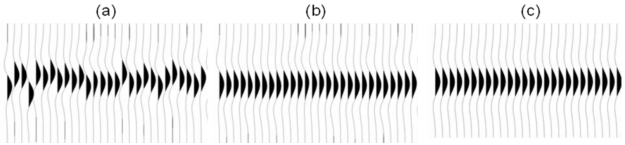
To the processor, removing the effects of the near surface means making things flat in the CMP domain. It turns out you can do this with travel time corrections (static shifts), you can do this with phase corrections, or you can do it with both.

A simple synthetic example showing (a) a gather with surface-consistent statics and phase variations; (b) the same gather after surface-consistent residual statics correction, and (c) after simultaneous surface-consistent statics and phase correcition. Image © Cary & Nagarajappa and CSEG.

It's troubling that there is more than one way to achieve flatness. Peter's advice is to use shot stacks and receiver stacks to compare the efficacy of static corrections. They eliminate doubt about whether surface consistent scaling is working, and are a better QC tool than other data domains.

Deeper than shallow

It may sound trivial, but the hardest part about using seismic waves for imaging is that they have to travel down and back up through the near surface on their path to the target. It might seem counter-intuitive, but the geometric configurations that work well for the deep earth are not well suited to the shallow earth, and how we might correct for it. I can imagine that two surveys could be useful, one for the target and one for characterizing the shallow that gets in the way of the target, but seismic experiments are already expensive enough when there is only target to be concerned with.

Still, the near surface is something we can't avoid. Much like astronomers using ground-based telescopes shooting for the stars, seismic processors too have to get the noisy stuff that is sitting closest to the detectors out of the way.

Another 52 Things hits the shelves

The new book is out today: 52 Things You Should Know About Palaeontology. Having been up for pre-order in the US, it is now shipping. The book will appear in Amazons globally in the next 24 hours or so, perhaps a bit longer for Canada.

I'm very proud of this volume. It shows that 52 Things has legs, and the quality is as high as ever. Euan Clarkson knows a thing or two about fossils and about books, and here's what he thought of it: 

This is sheer delight for the reader, with a great range of short but fascinating articles; serious science but often funny. Altogether brilliant!

Each purchase benefits The Micropalaeontological Society's Educational Trust, a UK charity, for the furthering of postgraduate education in microfossils. You should probably go and buy it now before it runs out. Go on, I'll wait here...

1000 years of fossil obsession

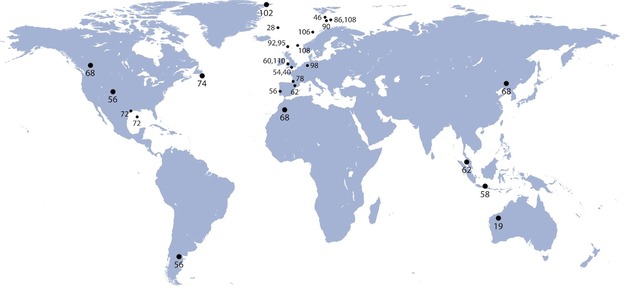
So what's in the book? There's too much variety to describe. Dinosaurs, plants, foraminifera, arthropods — they're all in there. There's a geographical index, as before, and also a chronostratigraphic one. The geography shows some distinct clustering, that partly reflects the emphasis on the science of applied fossil-gazing: biostratigraphy. 

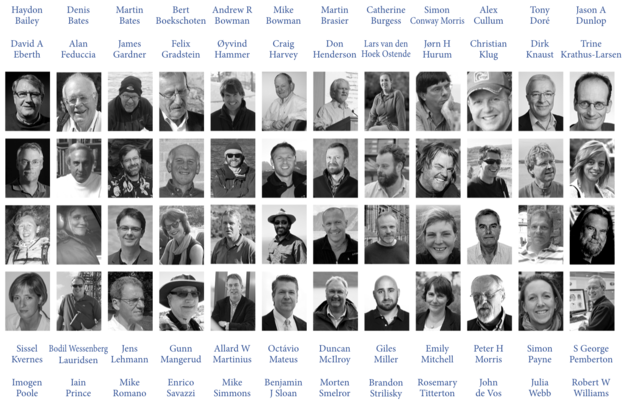
The book has 48 authors, a new record for these collections. It's an honour to work with each of them — their passion, commitment, and professionalism positively shines from the pages. Geologists and fossil nuts alike will recognize many of the names, though some will, I hope, be new to you. As a group, these scientists represent  1000 years of experience!


Amazingly, and completely by chance, it is one year to the day since we announced 52 Things You Should Know About Geology. Sales of that book benefit The AAPG Foundation, so today I am delighted to be sending a cheque for $1280 to them in Tulsa. Thank you to everyone who bought a copy, and of course to the authors of that book for making it happen.

Imaging with vectors

Even though it took way too long (I had been admiring it for quite some time), I recently became the first kid on the block to own a Lytro. The Lytro, if you haven't heard, is sort of like a camera, except that it definitely isn't. Apart from a viewfinder on one end, a piece of glass on the other, and a shutter release button on top, it doesn't really look or feel like a point-and-shoot or SLR either. It actually bares a closer resemblance to a pocket-sized telescope. So don't you dare call it a camera. Indeed, the thing that the Lytro is built to do is what makes it completely different than any camera, and this perhaps, is the best mark of its identity. It captures not only the intensity of the light rays hitting the sensor (or film), but the directionality of those light rays as well.

So what. Right? What does this mean? Why is this interesting? It means that with a light-field camera, the focal point and depth of field are parameters that can be controlled by the viewer. It is interesting because of freeing up of space and of the physical atoms of hardware by deliberately removing the motorized auto-focus mechanism, and placing instead into the capable and powerful hands of software. I find it particularly elegant that this technology was acheived as a result of harnessing light's true nature better than any other camera that came before it. A device designed to to record light as light is; a physical property defined by both a magnitude and a direction.

How do I interact with this picture? 

Normally this would be a weird question to ask, but with the Lytro the viewer can take part in the imaging process in three ways. Try it out on the samples above:

  • Point to focus: collecting the light field from a scene is a technical thing. Creating images by deciding what to focus on, and what to not focus on is an artistic thing. It is an interpretive thing. It's a narrative that the viewer has with the data. The goal of the light field camera is not to impose a narrative, but instead get entirely out of the way.
  • Extended focus: for artistic reasons, the viewer might want to have some parts of the image in focus, other parts out of focus. It's how our eyes work; our peripheral vision. But in cases where you want to see the full depth of field, where everything is in focus, the software has an algorithm for that (to try it out you can press 'E' on your keyboard).
  • Stereo viewing: speaks to the multidimensional nature of the vector field data. In the real world, when we move our head, the foreground moves faster than the background. So too with light-field images, you can simulate parallax, by moving your cursor and better understand the spatial relationship between objects in the scene.

These capabilities aren't just components of the device, they are technological paradigms embodied by the device. That, to me, is what is so incredibly beautiful about this technology. It's the best example of what technology should be: a material thing that improves the work of the mind.

A call to the seismic industry

The seismic wavefield is what we should be giving to the interpreter. This probably means engineering a seismic system where less work is done by the processor, and more control is given to the interpreter through software that does the heavy lifting. Interpreters need to have direct feedback with the medium they are interpreting. How does seismic have to change to allow that narrative?